
The Show Box
One app runs every show. Installed once, works offline.
The Mac app that runs every EntsOffice show. Install it once on your show computer and it works offline.
Included free with every gameshow licence.

- Your MacmacOS 11 or later
- 2 screensYour desk and the stage
- OfflineNo internet on show night
- 7 seasonal framesHalloween to Easter
See it in action.
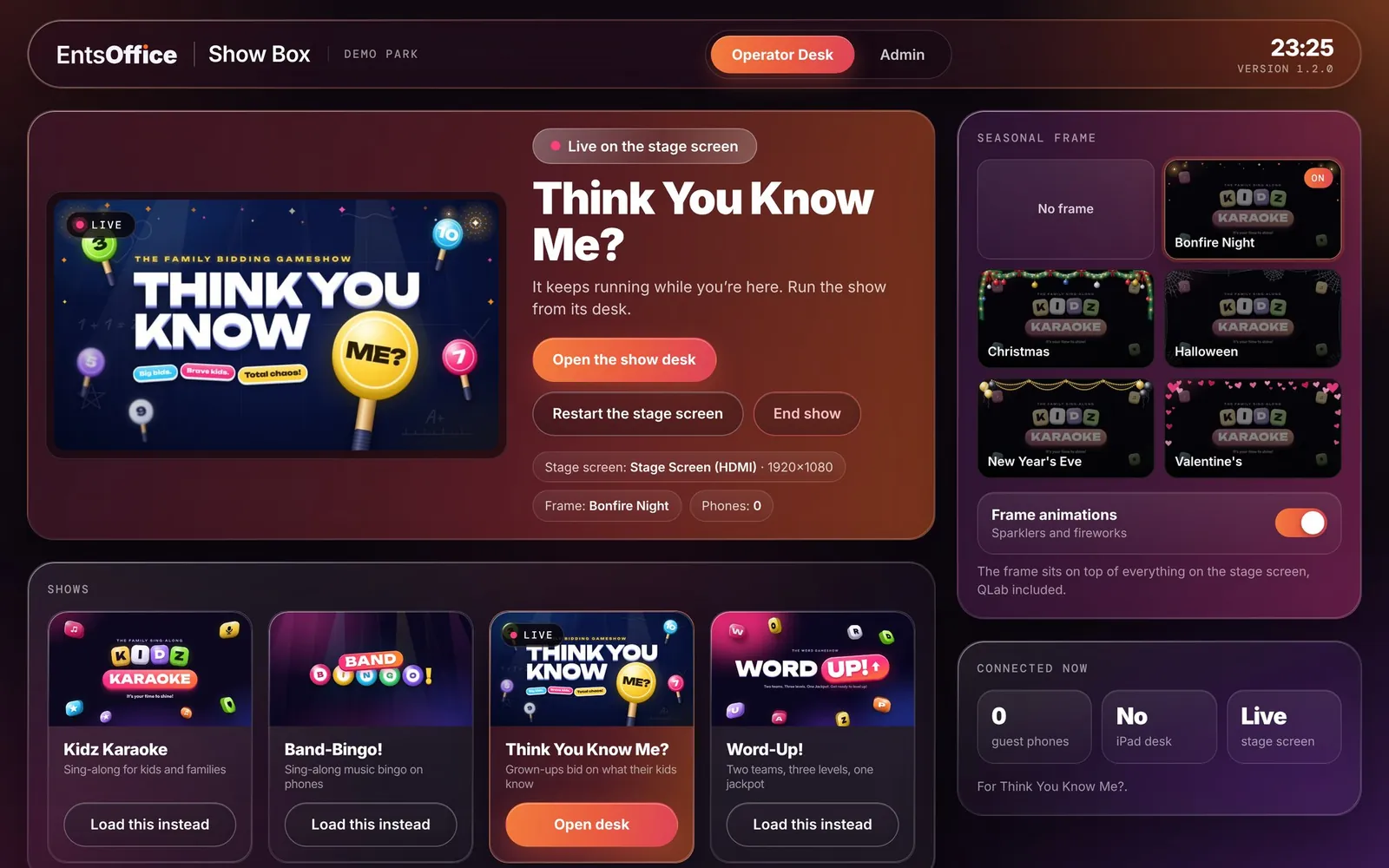
Operator DeskA live picture of the Stage Screen, every show you have, the seasonal frame and who is connected.
Key features
- One app for every show: load a show, put it up and end it, all from the Operator Desk.
- Runs offline on the Mac you already have, with no internet needed on show night.
- Seasonal frames dress the Stage Screen, and the animations switch off with one tap.
- Optional iPad desk over your Wi-Fi, so the host can run the show from anywhere.
- Keeps going: health checks and automatic recovery. If the Wi-Fi drops, every show carries on without phones.
- Hosts never touch a browser or a file.
Three steps to showtime.
- 1
Install once
Put the Show Box on your venue's show Mac and pick which screen is the stage.
- 2
Load a show
Pick a gameshow on the Operator Desk. Its holding screen waits until you're ready.
- 3
Fade up and play
Run it from the desk, or from an iPad anywhere in the room.
Free with every gameshow.
You don’t buy the Show Box separately. It comes with every gameshow licence, along with the seasonal frames.
Gameshow licences start at £1,995 + VAT for 12 months at one location. See all prices
Seasonal frames
Seasonal frames dress the Stage Screen for the time of year. A detailed, animated border sits over everything on the screen, our shows and the venue's own content alike, with small moments every couple of minutes and a big moment every few minutes, like Santa's sleigh sweeping across the bottom of the screen. Seven frames are ready now, with more on the way through the year. The animations switch off with one tap.
- Halloween
- Bonfire Night
- Christmas
- New Year's Eve
- Valentine's Day
- St Patrick's Day
- Easter
Read the full description
The Show Box is the operator's home for every show. It is installed once on the venue's show Mac and runs entirely offline. The Operator Desk tab shows what is live on the Stage Screen with a live preview, loads the next show to its holding screen, and puts it on the Stage Screen with a smooth fade when the host is ready. The Admin tab handles the screens, the iPad desk, the venue's licence and health checks, so set-up stays out of the way on show night.
Guests join phone games straight from their browser by scanning the QR code on screen, with nothing to download. An iPad can take over the desk over the venue Wi-Fi, so the host can run the show from anywhere in the room. Built-in health checks and automatic recovery keep the show running if anything hiccups.
Your Mac. Your screen. That’s it.
Every show runs from the Show Box app on the computer you already have.
- No internet needed on show night
- Children shown by first name only
- Rude team names filtered out
- Optional iPad desk over your Wi-Fi
- Wi-Fi drops? Every show carries on without phones
See The Show Box running.
Tell us a little about your business and we’ll walk you through it on a short video call.
The shows it runs.

Word-Up!
Two teams race to crack hidden words, level by level, to the Jackpot Word.
See Word-Up! Coming soon
Band-Bingo!
Bingo with the biggest choruses ever written instead of numbers.
See Band-Bingo! Coming soon
Think You Know Me?
Grown-ups bid on how much their child knows. Then the tables turn.
See Think You Know Me? Coming soon
Muiz: The Music Quiz
Ten rounds of music quiz, answered on phones, with a live leaderboard.
See Muiz: The Music Quiz